Us vs the others

Cratify vs other
home inventory apps.

Cratify is built around your possessions, your collections and your household. Here's what to check in any home inventory app, and how Cratify answers each one.

Free forever plan · iOS, Android & web · No credit card

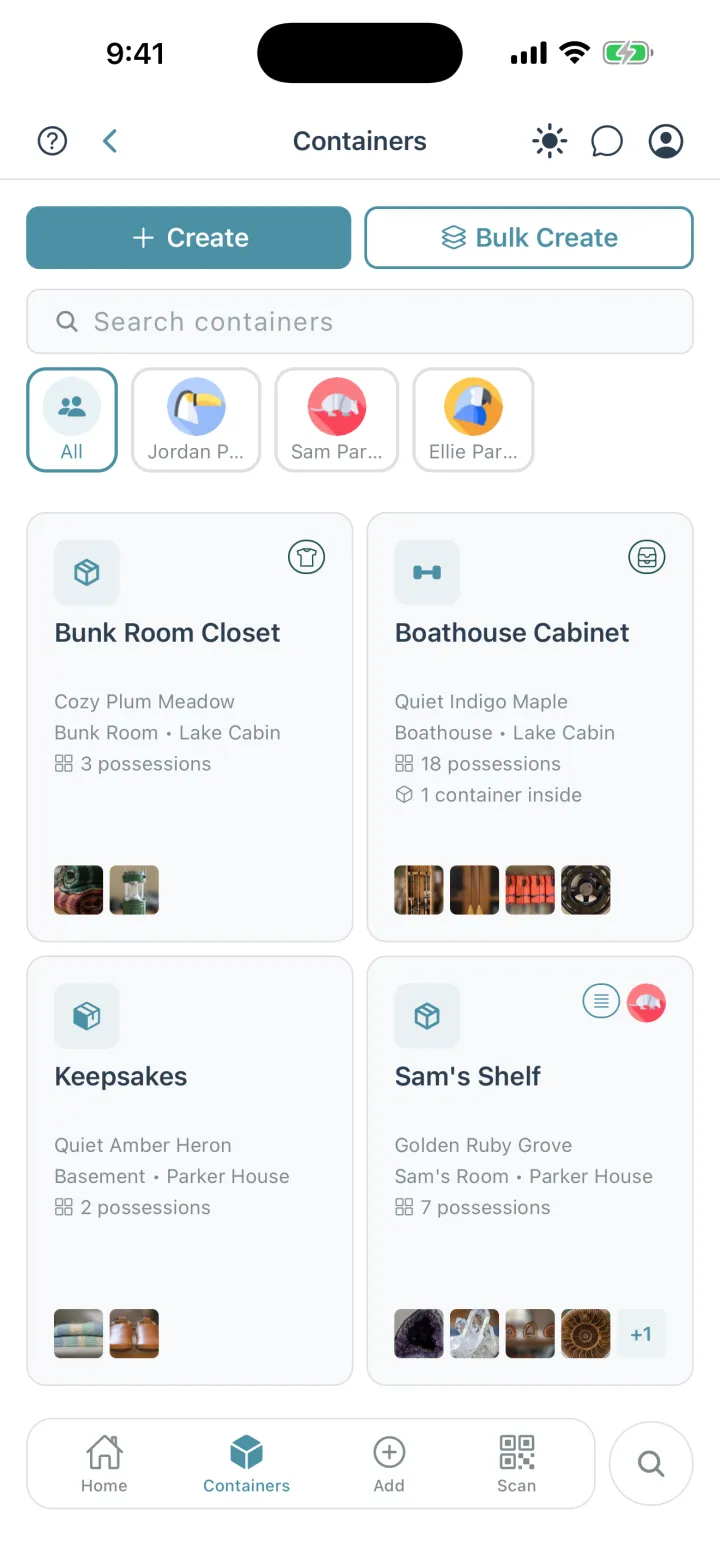
Cratify Containers screen for the Parker household: a filter for each person, and container cards such as Boathouse Cabinet at Lake Cabin with 18 possessions and 1 container inside, and Sam's Shelf in Sam's Room at Parker House
Every container, the room and place it's in, and who owns what's inside.

The short version

What Cratify is built around.

Plenty of apps can keep a list. Cratify keeps track of what you own, where it is, and whose it is.

Possessions

Snap a photo and AI names it. File each one in a container, a room and a place, then find it again in seconds.

Collections

One list for the camping gear or the holiday decorations, wherever each piece is kept. Check each piece off as you pack.

Households

Note whose each possession is, from the kids to the dog, and share with the people you live with. Sharing is on every plan.

Side by side

What to look for in a home inventory app.

The questions worth asking any app you're considering, with Cratify's answers next to the spreadsheet most people start with.

What to check in a home inventory app, comparing Cratify with a spreadsheet
What to check Cratify A spreadsheet
Adding possessionsA whole home is hundreds of possessions. Entry speed decides whether you finish.
Snap a photo and AI names it, with a suggested category, description and tags. 50 AI scans a month free, unlimited with Lifetime.
You type each row and attach photos yourself.
Finding it againThe reason you built the inventory in the first place.
Search covers names, descriptions, categories, tags, containers, rooms, people and collections, forgives typos, and includes what your household shares with you.
Find matches the words you typed.
Where it's keptReal homes nest: a container on a shelf, in a closet, in a room.
Containers inside containers, in rooms and places. Open any container to see everything inside it, all the way down, with totals.
Location columns you keep up to date.
CollectionsHoliday decorations and camping gear are rarely kept in one spot.
One list across rooms, containers and places. Check each piece off as you pack, or send the list as a PDF.
A filter or a separate tab.
Who owns whatIn a shared home, “whose is this?” matters as much as “where is it?”
Every possession can belong to someone, even people who don't use Cratify. Each person gets a page with what's theirs.
An owner column you add.
SharingEveryone who lives there should be able to look it up.
Share a location, a room or a single container, as editor or view-only. Included on every plan.
Share the file.
What's in a containerSeeing what's inside without opening it.
Handmarks: scan the name you already wrote on it (adding them comes with Lifetime). Or print its QR code on any printer.
Not built in.
Phone and computerAdd on your phone, then review and print on a bigger screen.
iPhone, Android and the web, all in sync.
Wherever your spreadsheet app runs.
What it costsCheck the free limits, and whether the price repeats every month.
Free for up to 250 possessions. Lifetime is $49.99 once, a launch price rising to $99 on Dec 1, 2026. It never renews.
Usually free.

Comparing a specific app? Ask it the same nine questions; its own website and store listing have its current answers. Or start with our head-to-head pages.

Adding possessions

One photo. Every possession named.

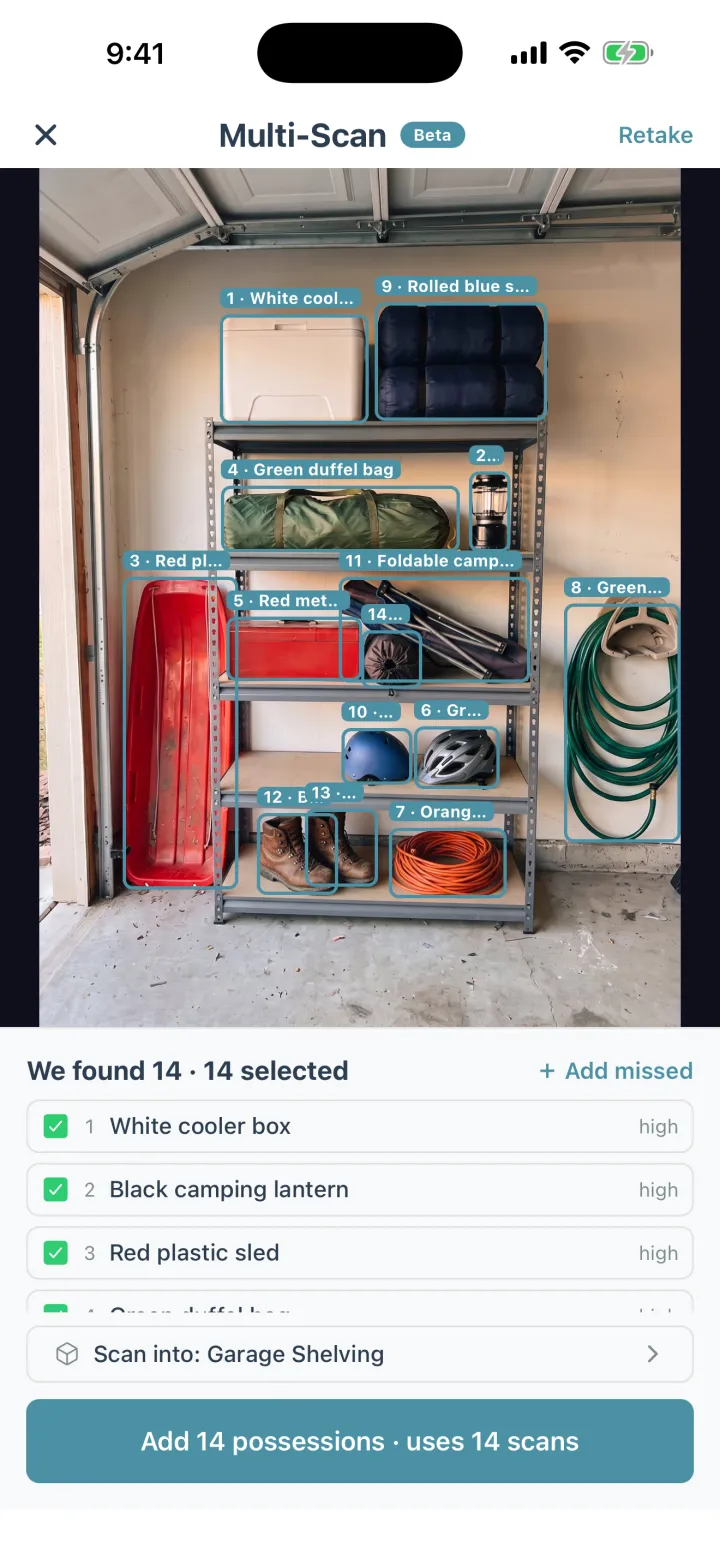
Point your camera at a shelf, a closet or a garage wall. Multi-Scan finds each possession in the photo, names it and files it in that container, and you can fix any name it got wrong.

  • One possession at a time works on every plan: 50 AI scans a month on Basic, unlimited with Lifetime.
  • Multi-Scan comes with Lifetime: up to 15 possessions from one photo.
  • Have three of the same possession? Set a quantity instead of adding it three times.
Cratify Multi-Scan on a garage shelf: fourteen possessions outlined and named, including a white cooler box, a camping lantern and a red plastic sled

New in Cratify · Handmarks · No labels to buy

No labels to buy. What you wrote is the label.

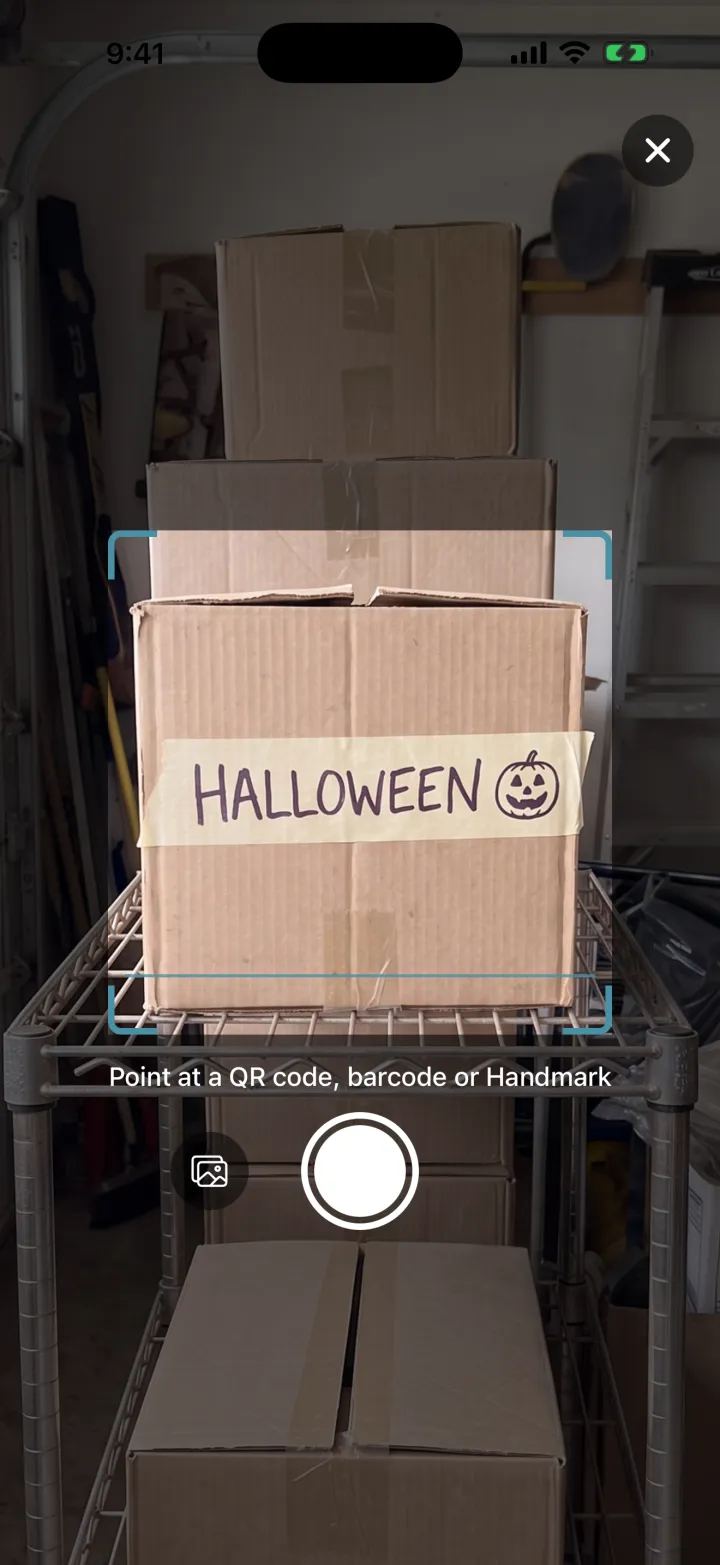
Many home inventory apps rely on you buying their QR labels. With Handmarks, whatever is already on a container becomes the code you scan: a strip of tape with a name on it, marker on the cardboard, or a kid's drawing.

  1. Photograph the mark onceOpen the container and tap Add Handmark. Labeled more than one side? Add one for each side.
  2. Point Scan at itThe same Scan button reads QR codes, barcodes and Handmarks.
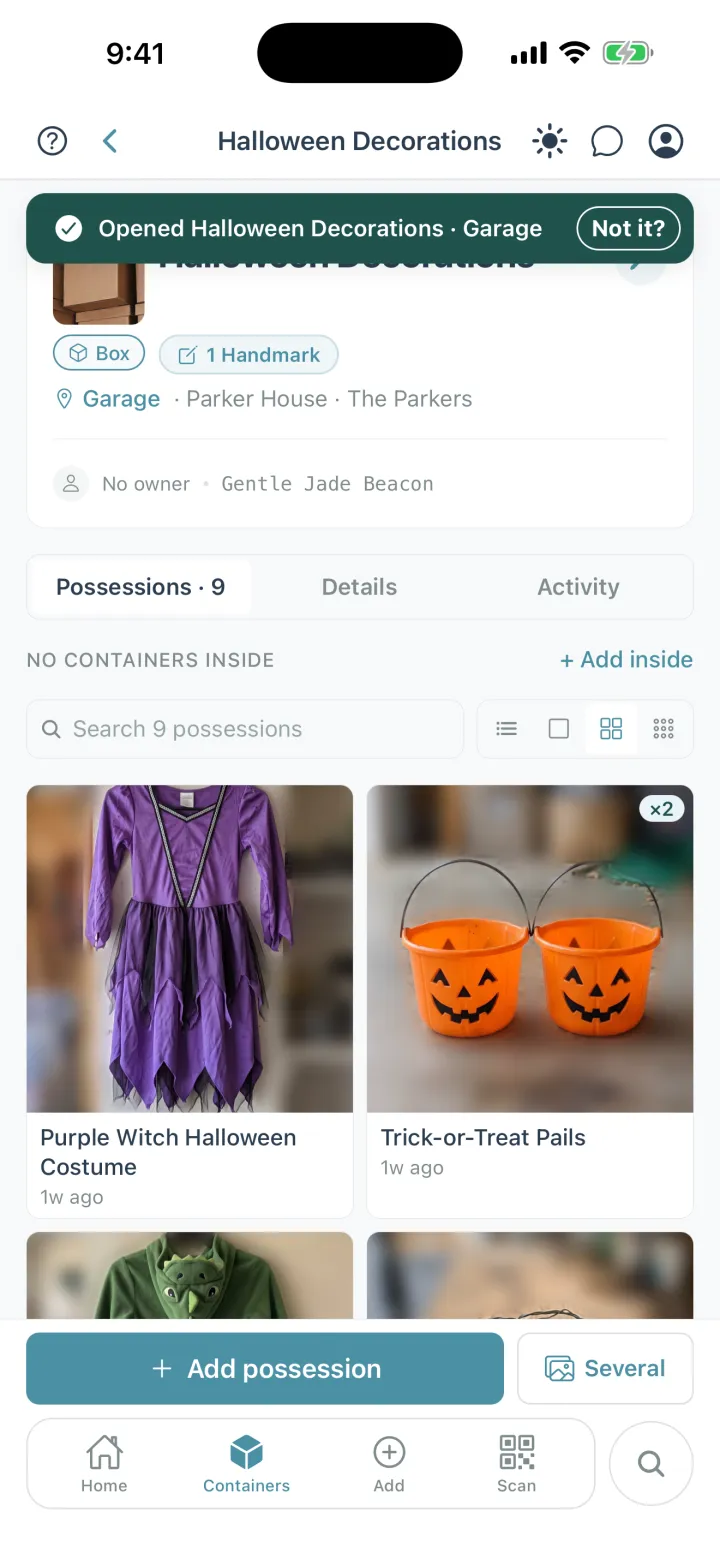
  3. It opens, with everything insideAnyone you share the container with can scan it too.
Cratify Scan pointed at a cardboard box marked HALLOWEEN on masking tape, with the prompt: Point at a QR code, barcode or Handmark
Cratify showing Opened Halloween Decorations, Garage, with 1 Handmark and the nine possessions inside, including a purple witch costume and two trick-or-treat pails

Adding Handmarks comes with Lifetime. Scanning a Handmark someone in your household added is free on every plan.

Rather have a code? Every possession and container also has its own QR code you can print on any printer, free on every plan.

Pricing

Free to start. Pay once, own it forever.

Your home isn't something you rent month to month, and knowing what's in it shouldn't come with a monthly bill.

Basic
$0 / forever
Start organizing today, no credit card
  • Up to 250 possessions
  • Up to 50 containers
  • 2 locations, 5 rooms
  • 50 AI scans per month
  • Sharing with your household
  • Print QR codes, and scan Handmarks your household adds
Start free

FAQ

Questions people ask while comparing.

What should I look for in a home inventory app?

Check how quickly you can add possessions, whether search finds them when you misspell something, whether it handles containers inside containers, whether your household can share it and note who owns what, how you tell what's in a container without opening it, which devices it runs on, and what it costs over time. The table on this page shows Cratify's answer to each.

Is Cratify free?

Yes. The Basic tier gives you 250 possessions, 50 containers, 2 locations, 5 rooms and 50 AI scans per month, free, with no credit card. When you need more, Lifetime unlocks everything for one payment of $49.99 (launch price, rising to $99 on Dec 1, 2026). New accounts can try Lifetime free for 3 days first, with no card and no automatic charge.

Is Lifetime a subscription?

No. Lifetime is one payment that unlocks unlimited possessions and AI identification, Multi-Scan, adding Handmarks, product barcode scanning and every future feature. It never renews.

Do I have to buy QR labels to use Cratify?

No. With Handmarks, whatever is already on a container becomes the code you scan: a name on a strip of tape, marker on the cardboard, or a kid's drawing. Adding Handmarks comes with Lifetime, and scanning one someone in your household added is free on every plan. If you'd rather use codes, every possession and container has its own QR code you can print on any printer, free on every plan.

Can my whole household use it?

Yes. Share a location, a room or a single container with the people you live with, as editor or view-only. Sharing is included on every plan, including Basic. You can also record who each possession belongs to, even someone who doesn't use Cratify, like a young child.

Which devices does Cratify run on?

iPhone, Android and the web. Your inventory syncs across all your devices, so you can add possessions on your phone and review or print labels on your computer.

Can I take my data with me?

Yes. Your inventory is private by default and visible only to the people you share with, and you can export or delete your data at any time.


Head to head

Comparing a specific app?

Side-by-side pages for the apps and methods people weigh against Cratify.

Try it on your own possessions.

Free forever plan. 250 possessions, 50 containers, 50 AI scans a month. No credit card required.

Or use it on the web →