New Handmarks: scan what you wrote on the box

AI home inventory

Know what you own.
Where it is.
Whose it is.

Photograph a shelf and Cratify names each possession on it, files it in the right container, and shares it with your household.

Free forever plan · $49.99 once for everything · iOS, Android & web · No credit card

800+ people have signed up for Cratify

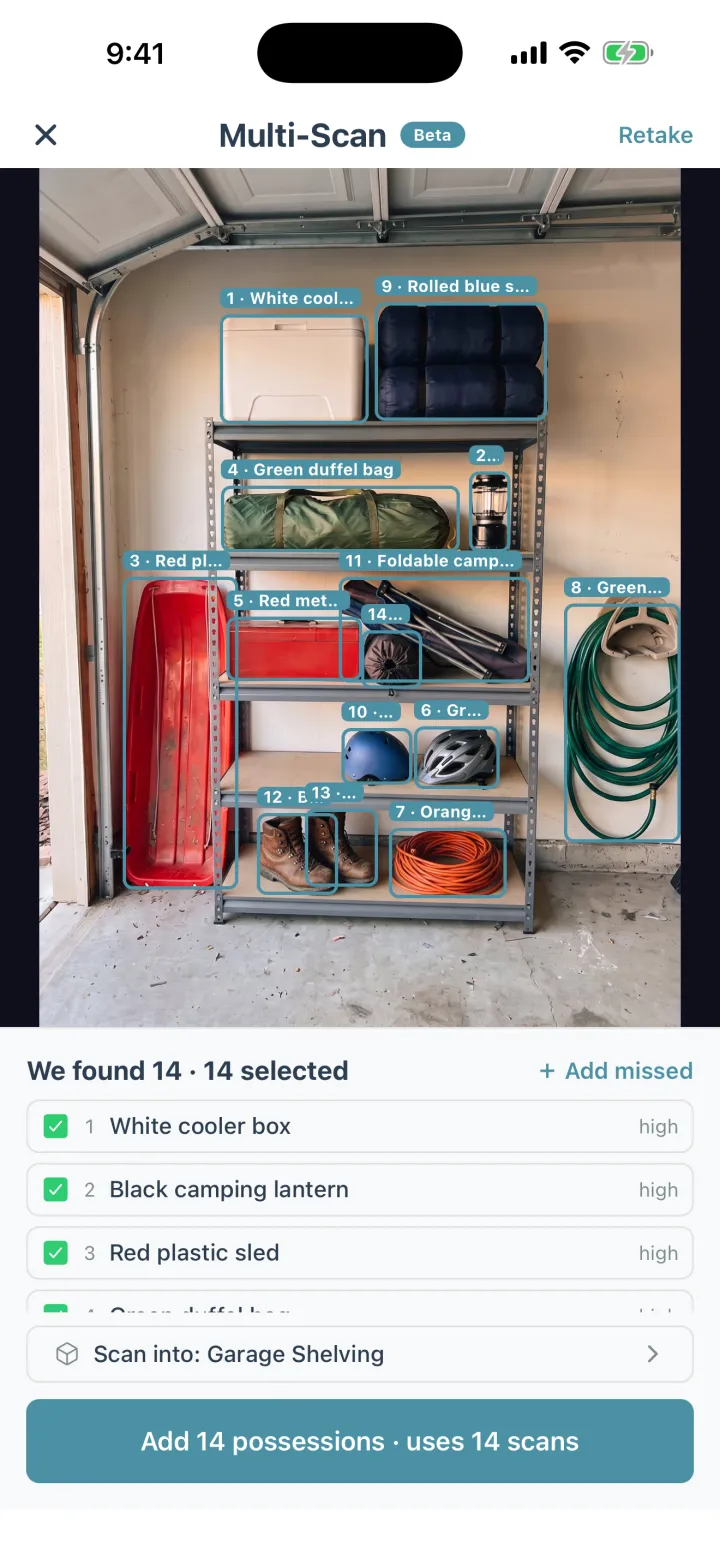
Cratify Multi-Scan on a garage shelf: fourteen possessions outlined and named, including a white cooler box, a camping lantern and a red plastic sled
Multi-Scan, included with Lifetime: one photo, up to 15 possessions named. Fix any name it got wrong.

Possessions · Collections · Households

Everything you own, organized for life.

One home inventory for the whole household: what you own, where it's kept, and who it belongs to.

Search every field

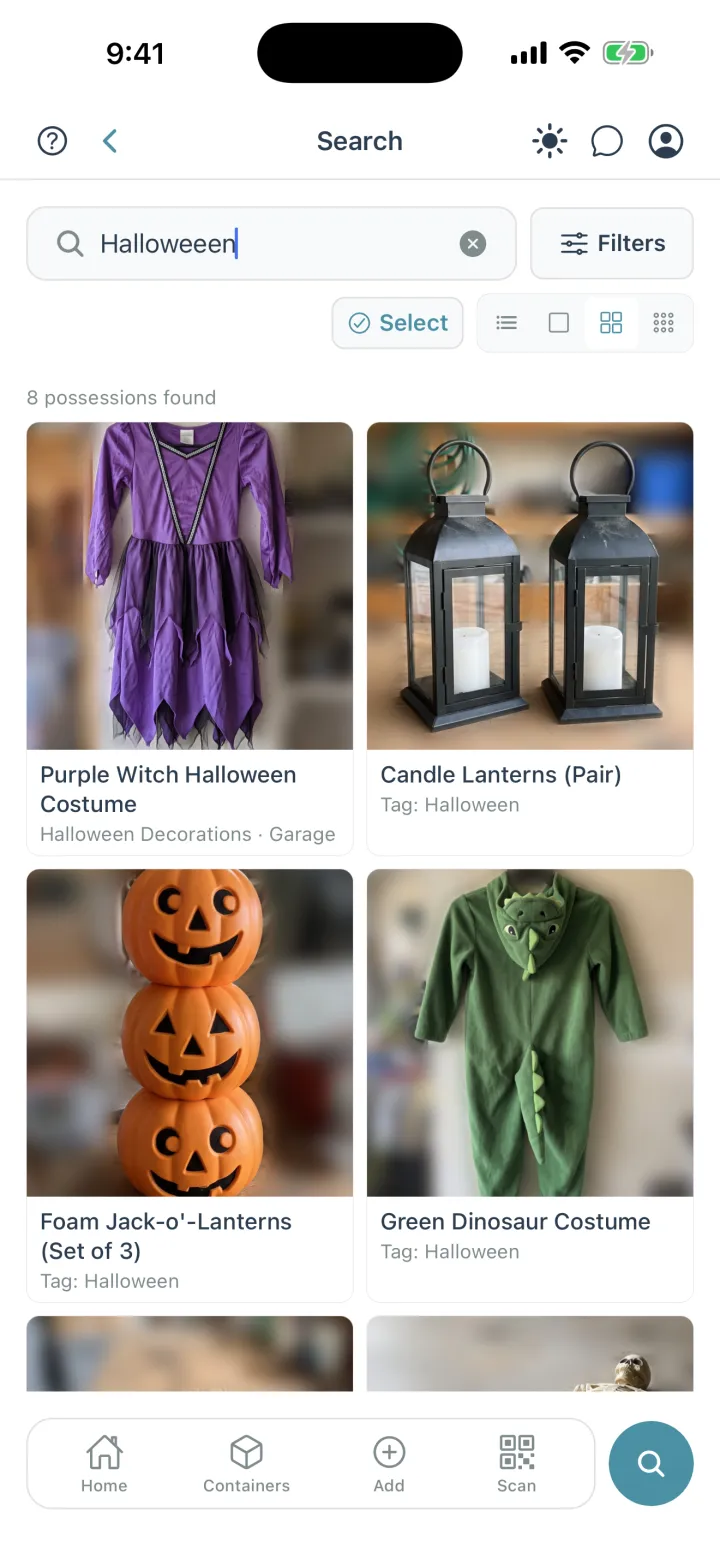
Typos? Still found.

Search looks through names, descriptions, categories, tags, containers, rooms, people and collections. It forgives typos and includes possessions your household shares with you.

  • Browse results as a list or a 1, 2 or 3-column photo grid. Cratify remembers your pick.
  • Open any possession to see the container, room and place it lives in.
  • With Lifetime, scan a product barcode to find the possession it belongs to.
Cratify search for "Halloweeen", misspelled, returning 8 possessions in a photo grid, including a purple witch costume and candle lanterns

Who owns what

Mine. Yours. The dog's.

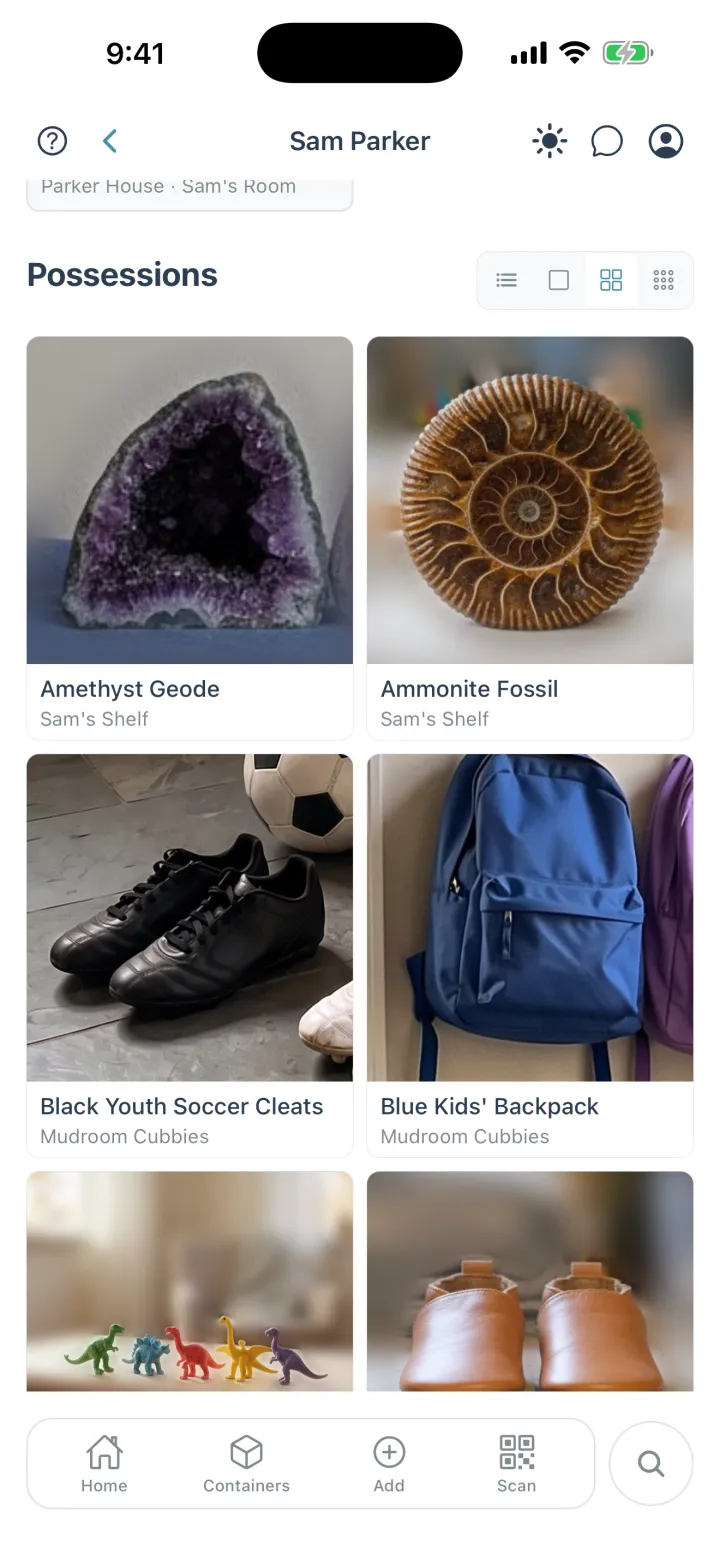
Every possession can belong to someone in your household, from the kids to the dog. Each person gets a page with what's theirs, and shared possessions always show who owns them.

  • Add people who don't use Cratify, like a young child, or invite them to join your household.
  • Share a location, a room or a single container, as editor or view-only.
  • Sharing is included on every plan, including Basic.
Sam Parker's page in Cratify: a photo grid of Sam's possessions, including an amethyst geode, an ammonite fossil and youth soccer cleats

New in Cratify · Handmarks · No labels to buy

Scan what you wrote on the box.

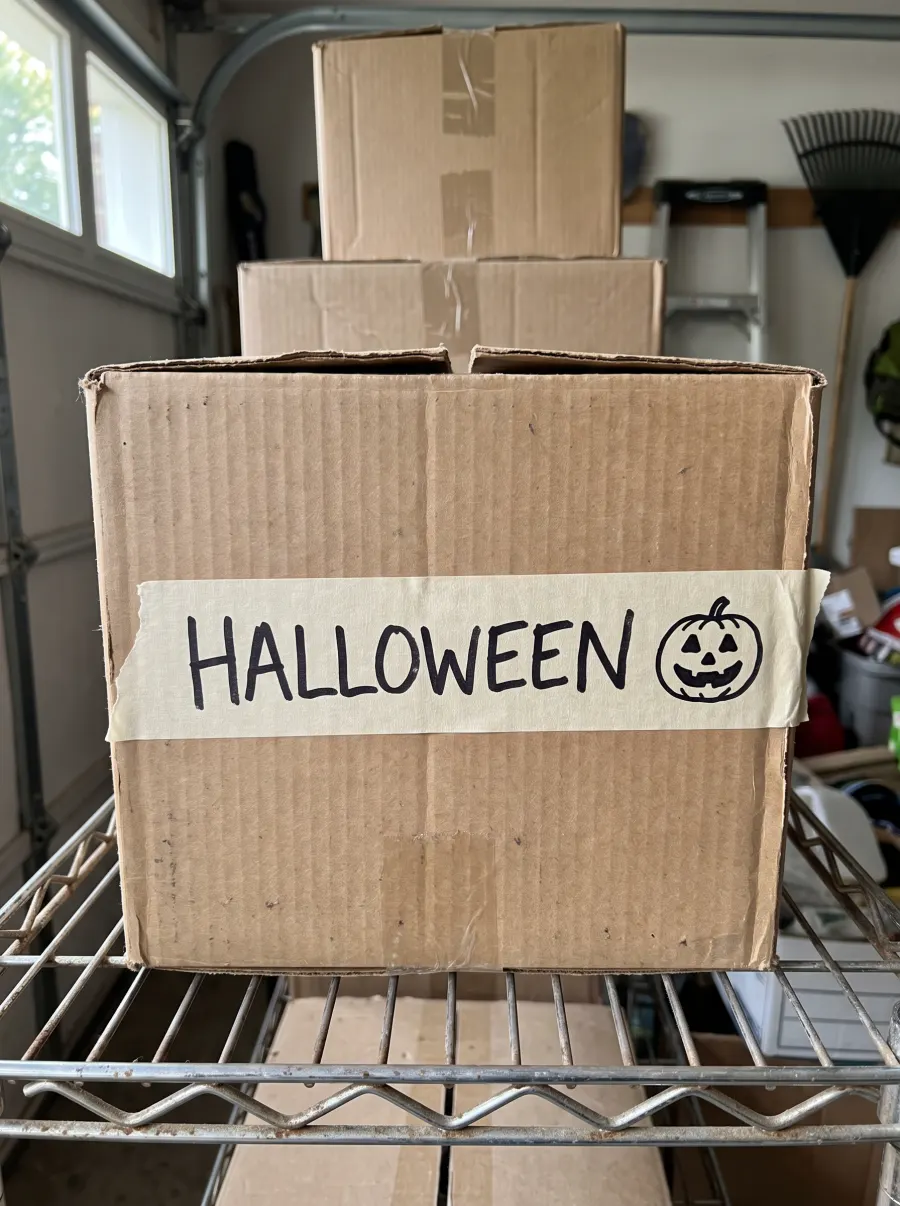
Many home inventory apps rely on you buying their QR labels. With Handmarks, whatever is already on a container becomes the code you scan: a strip of tape with a name on it, marker on the cardboard, or a kid's drawing.

  1. A cardboard box on a garage shelf with HALLOWEEN and a pumpkin drawn in marker on masking tape

    Photograph the mark once

    Open the container, tap Add Handmark and take one photo. Labeled more than one side? Add a Handmark for each side.

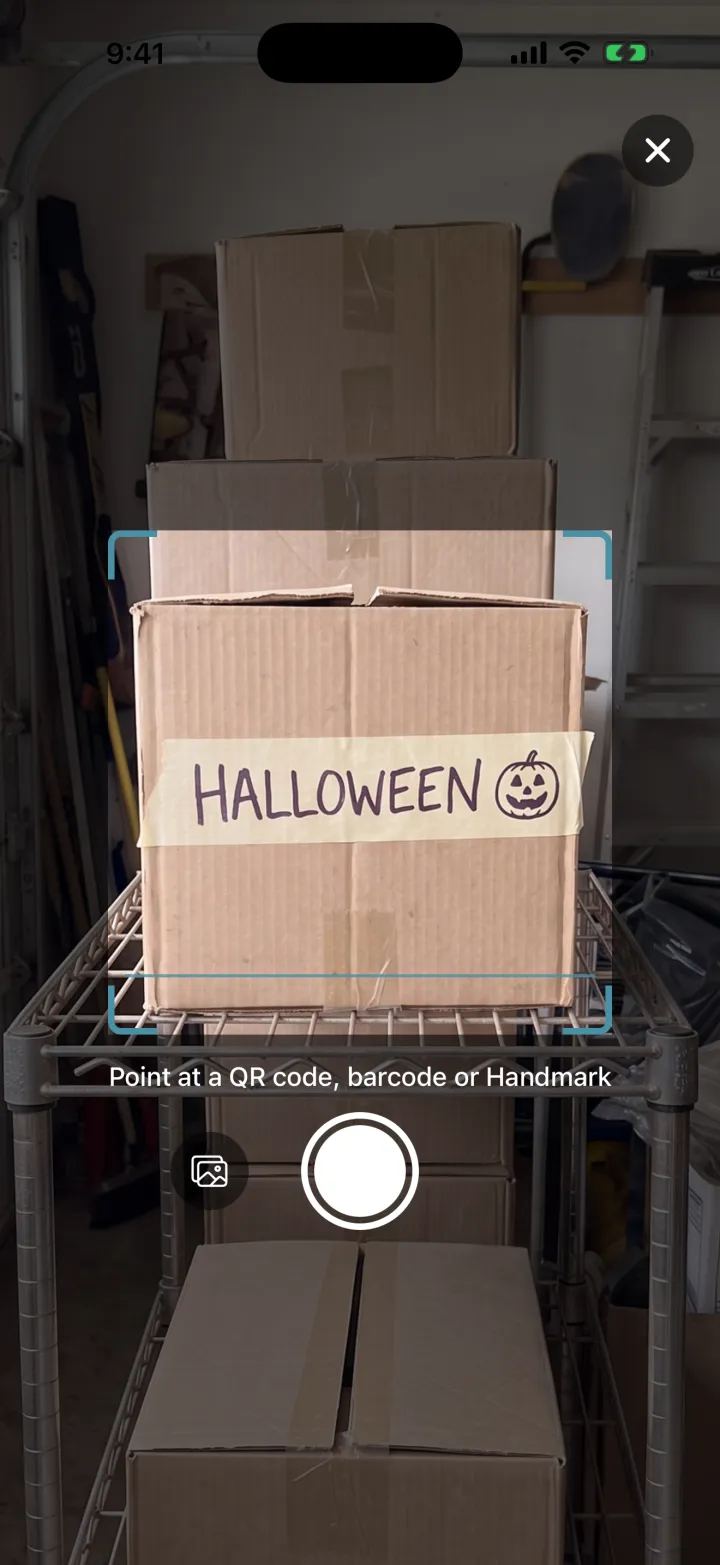
  2. Cratify Scan pointed at the HALLOWEEN box, with the prompt: Point at a QR code, barcode or Handmark

    Point Scan at the box

    The same Scan button reads QR codes, barcodes and Handmarks.

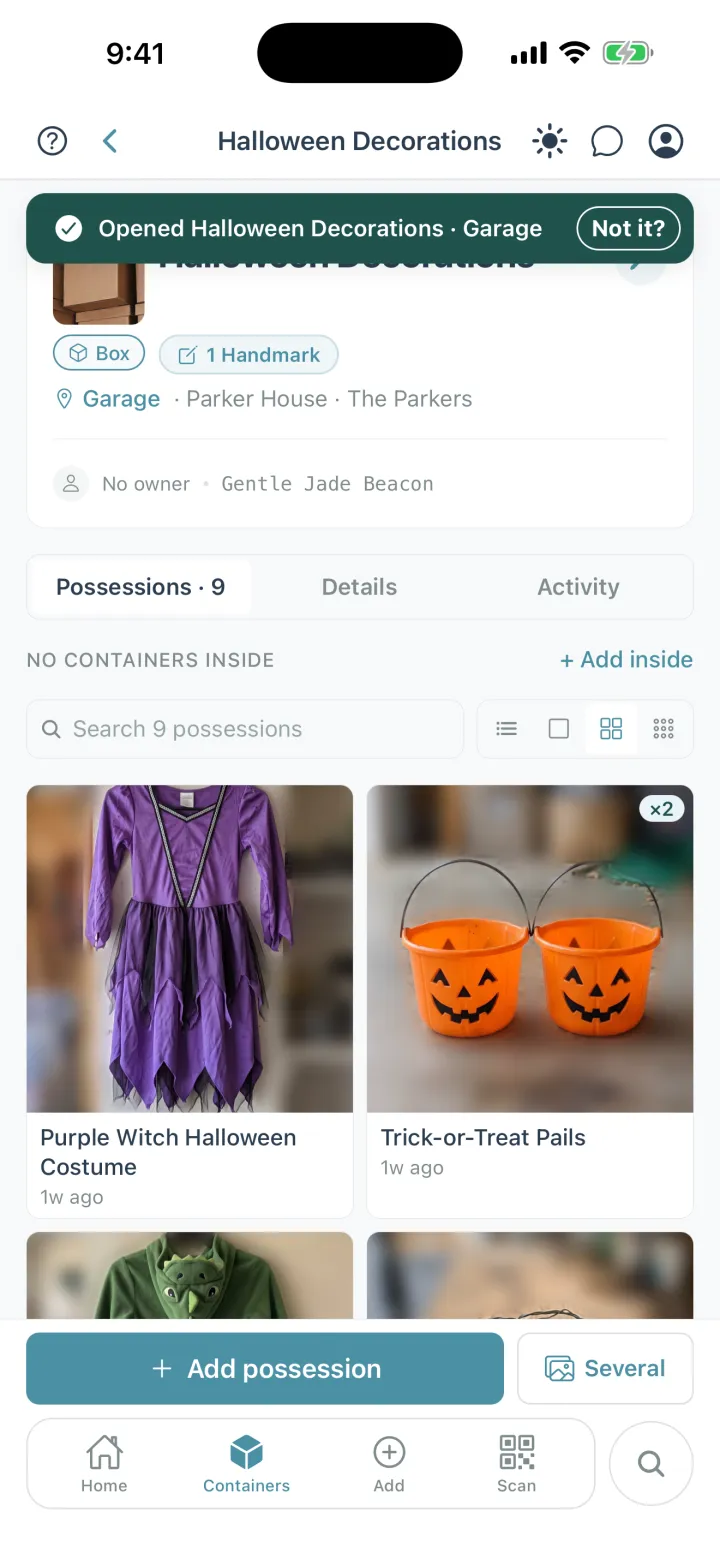
  3. Cratify showing Opened Halloween Decorations, Garage, with the nine possessions inside

    It opens, with everything inside

    Anyone you share the container with can scan it too.

Adding Handmarks comes with Lifetime. Scanning a Handmark someone in your household added is free on every plan.

Rather have a code? Every possession and container also has its own QR code you can print on any printer, free on every plan.

Get Lifetime · $49.99 once

Every feature, no subscription. Or start free with 250 possessions.

Containers inside containers

A bin on a shelf in a closet. Handled.

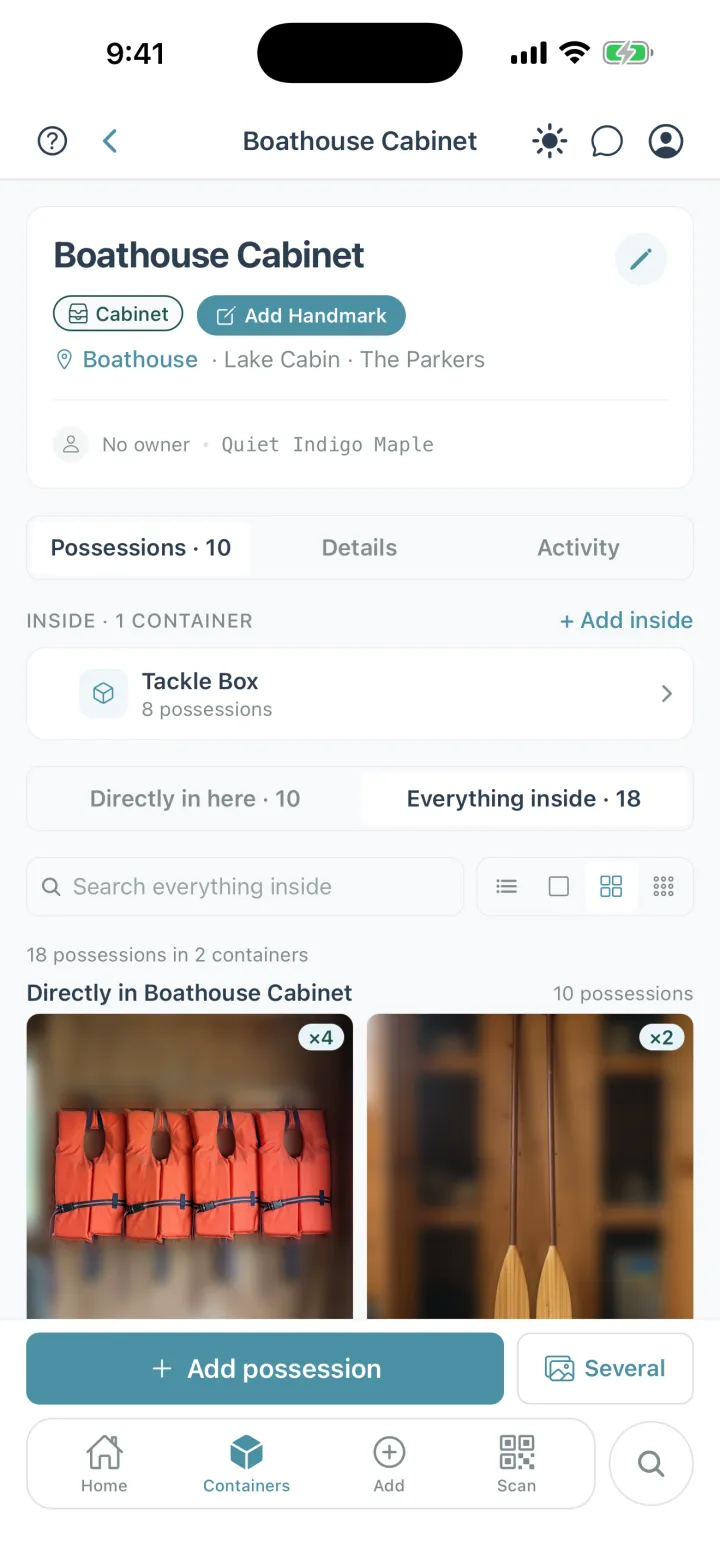
Pick “Inside” when you create or edit a container. Open any container to see everything inside it, all the way down, with totals.

  • Own three of the same thing? Set a quantity instead of adding it three times.
  • Search everything inside a container without leaving it.
  • When a photo shows a barcode or QR sticker you've already saved, Cratify asks before adding a duplicate.
A Boathouse Cabinet container in Cratify holding a Tackle Box container, with Everything inside showing 18 possessions in 2 containers

Keeping it current

Keeping it up to date is the easy part.

You don't need a perfect list. You need to stop dreading the boxes you can't face, and to know that when something moves, fixing the list takes seconds, not a weekend.

Moved something?

Open it and tap Move to another container. Two taps, no form. Cleared a whole shelf? Select everything on it and move it all at once.

Bought another?

Tap + on the possession. The quantity saves on its own, so the third extension cord doesn't need its own entry.

Putting something in a box?

Scan the box's QR code or Handmark and tap Add possession. The box is already filled in, so you just take the photo.

All three work on every plan, Basic included.

And the rest

The details that make it stick.

QR codes and barcodes

Every possession and container has its own QR code you can print on any printer. With Lifetime, scan a product barcode to find what it belongs to.

Receipts and documents

Save receipts and documents with your possessions, pull up just your receipts when you need them, and see totals in the currency you pick.

A record for insurance

A photographed, room-by-room record of what you own, for the day you hope never comes. Export your data any time.

Plants and supplies

Add plants with species, watering and light needs, and track supplies that run low, like batteries and filters, with a restock note.

Phone and web, in sync

Cratify runs on iPhone, Android and the web. Add possessions on your phone, then review and print labels on your computer.

Private by default

Only the people you share with can see your inventory. We never sell or share your possessions, photos or household details with advertisers.

Made for

Not built for running a store or a warehouse. Cratify tracks what you own, where it is and whose it is. It has no point of sale, purchase orders or reorder alerts.

Pricing

Free to start. Pay once, own it forever.

Your home isn't something you rent month to month, and knowing what's in it shouldn't come with a monthly bill.

4.0 on the App Store · 4 ratings · as of Oct 5, 2026
Basic · For getting started
$0 / forever
Start organizing today, no credit card
  • Up to 250 possessions
  • Up to 50 containers
  • 2 locations, 5 rooms
  • 50 AI scans per month
  • Sharing with your household
  • Print QR codes, and scan Handmarks your household adds
Start free
★★★★★
“Great app to keep track of all my items in my storage unit. I can easily reference the app and add tags to help sort my lists. A useful tool I didn’t know I needed!”
candicenoelle, tracks a storage unit · App Store review, April 2026
Brandon Nolte, founder of Cratify
I built Cratify for my parents: decades of stuff spread across boxes, closets and a storage unit, and no way to find anything. Questions, ideas or a bug? Email me at brandon@thecratesapp.com.
Brandon Nolte, founder · Why I made Cratify →

FAQ

Frequently asked questions.

What can I keep track of in Cratify?

Everything you own. Snap a photo and Cratify names the possession, then you file it in a container, room and location. Group possessions into collections, note who each one belongs to, and share with the people you live with.

Is Cratify really free to use?

Yes. The Basic tier gives you 250 possessions, 50 containers, 2 locations, 5 rooms, and 50 AI scans per month — free, no credit card, forever. When you need more, Lifetime unlocks everything for one payment of $49.99 (launch price, rising to $99 on Dec 1, 2026) — no subscription. New accounts can try Lifetime free for 3 days first, with no card and no automatic charge. Lifetime bought on our website comes with a 30-day money-back guarantee: email us and we refund, no questions.

Can I share with family members?

Yes — sharing is available on every plan, including Basic. Share a whole location or a single container, choose view-only or edit access, and change it anytime.

What does the AI actually do?

Take a photo and the AI names the possession and suggests a category, description, and tags. With Lifetime, Multi-Scan finds up to 15 possessions in one photo, so you can catalog a whole drawer or shelf at once.

How accurate is the AI?

It suggests a name, category, description and tags for each possession. It's a suggestion, not a promise: it will sometimes get a niche collectible or a specific model wrong, and you can change any name before or after you save. Basic includes 50 AI scans a month, so you can see how it does on your own things before paying anything.

How do I keep my inventory up to date?

Small updates, as things change. Moved something? Open it and tap Move to another container, or select a whole shelf's worth and move them together. Bought another? Tap + to raise the quantity. Putting something in a box? Scan the box's QR code or Handmark and tap Add possession, and the box is already filled in. All of it works on every plan.

What is a Handmark?

A Handmark is one photo of whatever is already on a container: a name on a strip of tape, marker on the cardboard, or a kid's drawing. After that, point Scan at it and the container opens with everything inside. Adding Handmarks comes with Lifetime. Scanning a Handmark someone in your household added is free on every plan.

What's the difference between People and Sharing?

People lets you record who each possession belongs to — even someone who doesn't use Cratify, like a young child. Sharing gives another Cratify user access to your inventory. You can also invite a Person to become a collaborator.

How do the QR codes work?

Every container and every possession has its own QR code. Print labels on any printer, stick one on, and scan it with your phone to see what's inside without opening it.

Can I export a record my insurance adjuster will accept?

Insurers set their own rules, so we can't promise what yours will accept. Ask your adjuster what they need. What Cratify gives you: a photo of every possession, filed by location, room and container; a PDF of any collection, grouped the same way with a photo of each possession; and a file of your whole inventory (JSON). Possessions don't store purchase prices yet, so keep receipts for valuable things too. You can save them in Cratify as documents.

Is my data secure?

Yes. We use industry-standard encryption and secure cloud infrastructure. Your inventory is private by default, visible only to people you explicitly share with, and never shared with advertisers. We do share limited sign-up and purchase info with ad platforms to measure our ads, and you can turn that off anytime in Privacy Settings. See our Privacy Policy.

What platforms is Cratify on?

Cratify runs on iOS, Android, and the web. Your inventory syncs across all your devices — add possessions on your phone, review and print labels on your computer.


Know where everything you own is.

Free forever plan. 250 possessions, 50 containers, 50 AI scans a month. No credit card required.

Or use it on the web →